Clever Games Minesweeper is a free online logic puzzle that asks you to open every safe tile and leave the mines covered. Play minesweeper on boards from 9×9 to 30×16, with a safe first tap and a no-guess mode. The clock only records your time and never ends a round.
How to play minesweeper?
Open every tile that hides no mine, and never open a mine. Each number tells you how many of the eight tiles around it are mines. Start on Beginner in No-guess mode, where every board can be solved by logic alone.
- Choose a board. Pick a level (Beginner, Intermediate, Expert or Custom) in the level menu. No-guess is the default mode; Classic is the other choice in the mode menu beside it.
- Make your first move. Tap or click any tile. The first move is always safe and opens an area, because the board is built after you choose.
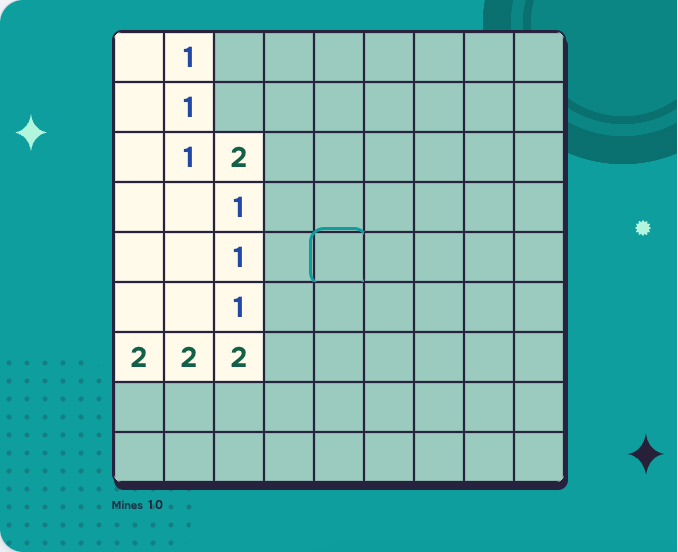
- Read the numbers. A number counts all touching mines, diagonals included. A tile with no mines nearby opens its whole neighborhood at once.
- Flag what you can prove. Right-click, long-press, or switch the Open / Flag toggle to Flag mode (key F on a keyboard) to mark a mine. Flags are notes for you; they do not decide the result.
- Clear the rest. Compare neighboring numbers, open the tiles you can prove safe, and press Teach me when you are stuck. You win when every tile without a mine is open.
To use the keyboard, move with the arrow keys and press Enter to open a tile. The first time you visit, a three-step tutorial on the Beginner board shows the first tap, a number and the flag toggle. You can skip it.
What are the minesweeper rules?
The minesweeper rules are short: mines are hidden, numbers are clues, and you win by opening all tiles that have no mine. Opening a mine ends the round. That is the only way to lose, and there is no error counter.
A number counts the mines in the eight tiles around it. Tiles on an edge or in a corner have fewer neighbors, so their numbers are smaller. When you open a tile with zero mines around it, the board opens the whole connected empty area and the numbers along its border. Your first move is guaranteed safe and always opens such an area.
Chording is a shortcut for experienced players. When a number has exactly that many flags around it, you can open all its other neighbors in one move: click the number with a mouse, tap it on a touchscreen, or press Enter on it with the keyboard. If one of those flags is wrong, the move opens a mine, so check each flag first.
The mines counter shows the total number of mines minus the flags you placed. Reaching zero does not prove your flags are right. The timer starts with your first move. Press the timer to pause; the board is hidden until you press Resume. There is no Undo, so think before you tap.
When a mine is opened, it bursts on a red tile, the other mines open one by one, and then a result panel appears with Play again and Retry this board. Incorrect flags turn into a cross, so a symbol, not only a color, shows what went wrong.
Which levels and modes can I play in this minesweeper game?
You can play four levels in two modes. No-guess mode, the default, builds boards that a logic solver finishes without a single guess. Classic is an ordinary random board and can force a guess late in the round.
| Level | Board | Mines | Best for |
|---|---|---|---|
| Beginner | 9 × 9 | 10 | Learning numbers and flags; the quickest round |
| Intermediate | 16 × 16 | 40 | Comparing clues along a longer border |
| Expert | 30 × 16 | 99 | Wide boards with several areas to track |
| Custom | 5–30 wide, 5–24 high | 1 up to 35% of the tiles | Your own size and mine density |
Use Custom when you want a different size or density. Press Custom, choose the columns, rows and mines, then press Apply. If the mine count is too dense for a verified No-guess board, the message “Too many mines for a no-guess board. Try fewer mines.” appears after your first tap, and you can lower the count or switch to Classic.
Stats keeps a row for each mode and level on this device: rounds played, rounds won and best time. Custom boards have a row of their own, so an unusual size never changes your Beginner, Intermediate or Expert record. A round on Beginner takes about 2 minutes, which is an estimate rather than a measured average.
Which minesweeper patterns help me find safe tiles?
Start with the simplest deduction and move to patterns only when the easy ones run out. Most minesweeper patterns are two or three neighboring numbers read together.
- One mine already found. If a number touches exactly as many flagged mines as it shows, every other covered neighbor is safe. Open them.
- Number equals covered tiles. If a number shows 3 and has exactly 3 covered neighbors, all three are mines. Flag them.
- 1-1 at the edge. Two neighboring 1s along a wall share some covered tiles. If one 1 sees only a subset of the other’s tiles, the extra tiles of the larger set are safe.
- 1-2-1. Three numbers in a row against a covered strip: the two outer covered tiles are mines and the middle one is safe, as long as no other covered tile touches those numbers.
- 1-2-2-1. Four numbers in a row along a covered strip: the two middle tiles of the strip are mines, and the end tiles are safe.
Before using any pattern, subtract the mines you have already proven. A pattern only holds when no other covered tile touches the numbers involved. After every opening, scan the border again, because a new number often settles a clue that looked unclear a moment ago.
Keep guesses out of your flags. Place a flag only on a mine you can prove, so that chording stays safe and your board stays readable. Teach me explains the deduction it uses whenever you press it and names the pattern when it is a 1-2-1 or a 1-1 at the edge.
How does Teach me work in no-guess minesweeper?
Teach me rings a tile that is provably safe and explains why in a sentence or two. When the reason is a known pattern, it names it, for example “1-2-1” or “1-1 at the edge”; otherwise it counts the mines left around the numbers involved. Press it as often as you like. There is no limit, and the result panel shows how many hints you used.
The idea is that a no-guess board always has a logical next move, so the hint never has to point at luck. When the proof needs several clues checked together, the card simply says “This cell can’t be a mine.” You still decide when to open the highlighted tile, so you can check the explanation against the numbers first.
In Classic mode a safe move may not exist. In that case Teach me says “No safe move — this one is a guess” and highlights the covered tile with the lowest chance of holding a mine. It does not look at the hidden mine layout.
Who can play minesweeper free online?
Anyone who likes clear rules and quiet thinking can play minesweeper free in a browser, with no account. It is especially useful for the following groups.
- Students can use a short round on Beginner to practice explaining a deduction step by step.
- Teachers can show a board in class and ask which tile is provably safe and why.
- Families can take turns on the same board and compare their reasoning, starting on Beginner.
- Seniors can use the plus and minus buttons on a phone or tablet to enlarge the tiles, and the Open / Flag toggle instead of a long-press.
- Commuters can play a two-minute Beginner round and pause it when the stop comes.
On a phone, Intermediate and Expert open scaled down so the whole board is visible. Pinch with two fingers or use the plus and minus buttons to enlarge it, then drag to move the board.
What can I practice when I play minesweeper?
You can practice counting neighbors, comparing overlapping clues and telling a proven fact from a hunch. Each move asks one question: does the visible information force this tile to be safe?
Regular rounds help you build focus and careful checking, because one careless tap ends the round. Describing a safe move before you make it trains logic more than speed does. Compare your own reasoning with the Teach me line, and treat your best time as a bonus rather than the goal. Minesweeper is a brain teaser for fun and practice, not a medical or training program.
Where does minesweeper come from?
Minesweeper belongs to a family of mine-clearing puzzles for home computers that appeared in the 1980s, and it became a common sight on personal computers in the early 1990s. The core idea has stayed the same ever since: a grid, hidden mines and numbers that count neighbors.
This version has its own look: flat tiles, its own number colors and its own mine symbol, with sounds made for it. It adds a solver-checked no-guess mode and the Teach me hint. Opening an empty area ripples outward, and a mine bursts into particles rather than anything graphic.
What are the most frequently asked questions about minesweeper?
Reveal every safe tile and leave the mines covered. These answers cover the questions players ask most often.
How to play mine sweeper if I have never tried it?
Start on Beginner. Your first move on a new board is safe. Read the numbers around the opened area, or choose Teach me to see a worked example.
Is minesweeper free to play at every level?
Yes. Every level, Custom boards, both modes and the Teach me hint are free, with no sign-up. Nothing is locked behind wins or payments.
Is the first click always safe?
Yes, on a new board. The mines are placed after your first move, so that tile is never a mine and an empty area opens right away. Retry this board, offered after a lost round, replays exactly the same mine layout as the round you lost.
Do I have to flag every mine to win?
No. You win by opening every tile that has no mine. Flags are only notes, though they are needed for chording. Do not trust a flag you cannot prove.
Why did tapping a number open a mine?
That was chording. When a number has as many flags around it as its value, one tap opens its other neighbors, and a wrong flag sends the move to a mine. Prove each flag before you chord.
Does no-guess mean every move is obvious?
No. It means a logical move always exists, not that it is easy to spot. Some boards need several clues compared together, which is where Teach me helps.
Can I save and come back later?
Yes. Progress is saved on this device. When you return, the round you left opens where you stopped; press New puzzle if you want a fresh board instead. Clearing your browser data removes the saved round.
Can I share a board?
Yes. Use Share to send a link to the board you are playing. After a win, the result panel offers Share, New puzzle, Harder level and Try another puzzle.