Clever Games Maze is a free online pathfinding puzzle that lets you solve square, circular and hexagonal mazes on screen or print a fresh one with its solution key. Pick a shape and a level, then guide your marker from the entrance to the exit. Every maze is generated on your device, so a new route is one tap away.
How do you play a maze game?
Guide your marker from the entrance to the exit through connected passages. Walls block movement, so look for a gap before choosing a direction. There is no countdown to beat and no penalty for a dead end.
- Choose a shape and a level. Square is the familiar start, Circular wraps passages around rings toward a goal in the center, and Hexagonal uses six-sided cells. Begin with Easy while you learn the controls.
- Find the entrance and the exit. They are marked S and E on the board. Your marker, a green dot, starts at S.
- Move along a passage. Drag the dot with a finger or mouse along a corridor, press the on-screen arrows, or use the arrow keys or WASD. The first time you open the page, a short tutorial points out your marker, the exit and the Hint button; you can press Skip.
- Go back when you hit a dead end. Drag back along your own trail and the trail erases as you retreat. There is no Undo or Redo, because stepping back is simply another move. Hint shows the next five steps of the correct route from where you stand.
- Reach the exit. The result panel shows your time and moves, plus the hints you used if you asked for any. Next maze starts another one, and Bigger maze moves up a level.
A dead end is a cell with only one open passage.
What are the rules of a maze game?
Move your marker from the entrance to the exit without crossing a wall. You can only step across an open shared side into a neighboring cell, and there is no way to lose.
Every maze on this page is a perfect maze: all cells connect, and there is exactly one route between any two cells. That means no loops and no second way around a wall. A branch that looks promising can still lead away from the exit, but the exit is always reachable. This holds for every shape and every generation style.
Each shape has its own entrance and exit.
- Square: the entrance is in the upper left corner and the exit in the lower right. Cells have no diagonal moves.
- Circular: you enter from the outside and the goal is in the center. Up and Down move toward and away from the center, and Left and Right move along the ring.
- Hexagonal: the entrance and the exit sit on opposite sides. Each cell has six neighbors, so the keys Q, W, E, A, S and D cover the six directions; the left and right arrow keys work like A and D. Touching at a corner does not create a passage.
Pressing into a wall makes the board shake briefly and no step is taken. Moving backward erases the last stretch of your trail and still counts as a move. Pausing hides the board until you press Resume. To finish, you must reach the exit yourself; watching Show solution does not count as a solve.
Which mazes can you play or print?
You can play square, circular and hexagonal mazes at four levels, or use Generator to prepare any of them for printing. A level sets the size of the board, not a promised solving time.
| Choice | What it changes | When to choose it |
|---|---|---|
| Square | Rows and columns of square cells | Learning movement and tracing straightforward turns |
| Circular | Rings divided into sectors, exit in the center | Following curved passages inward |
| Hexagonal | A hexagon of six-sided cells, entrance and exit on opposite sides | Reading routes with slanting connections |
| Generator | A preview with shape, level and style settings | Making a maze to print with a separate solution page |
| Easy | Square 10×10, Circular 6 rings, Hexagonal side 5 | Learning the controls |
| Medium | Square 20×20, Circular 10 rings, Hexagonal side 9 | A larger layout still visible at a glance |
| Hard | Square 30×30, Circular 15 rings, Hexagonal side 13 | Following many junctions |
| Huge | Square 60×60, Circular 24 rings, Hexagonal side 20 | A big board for a long session |
For circular mazes the level sets the number of rings, and for hexagonal mazes it sets how many cells run along each side of the hexagon.
There are three styles, and Winding is the default. Winding grows a route deeply before returning to earlier branches, which gives long corridors. Branching grows from the edge of the connected region and gives many short side branches. Even joins separate regions while avoiding loops, which gives an even texture. The styles change the pattern of passages; none promises an easier or harder puzzle than another.
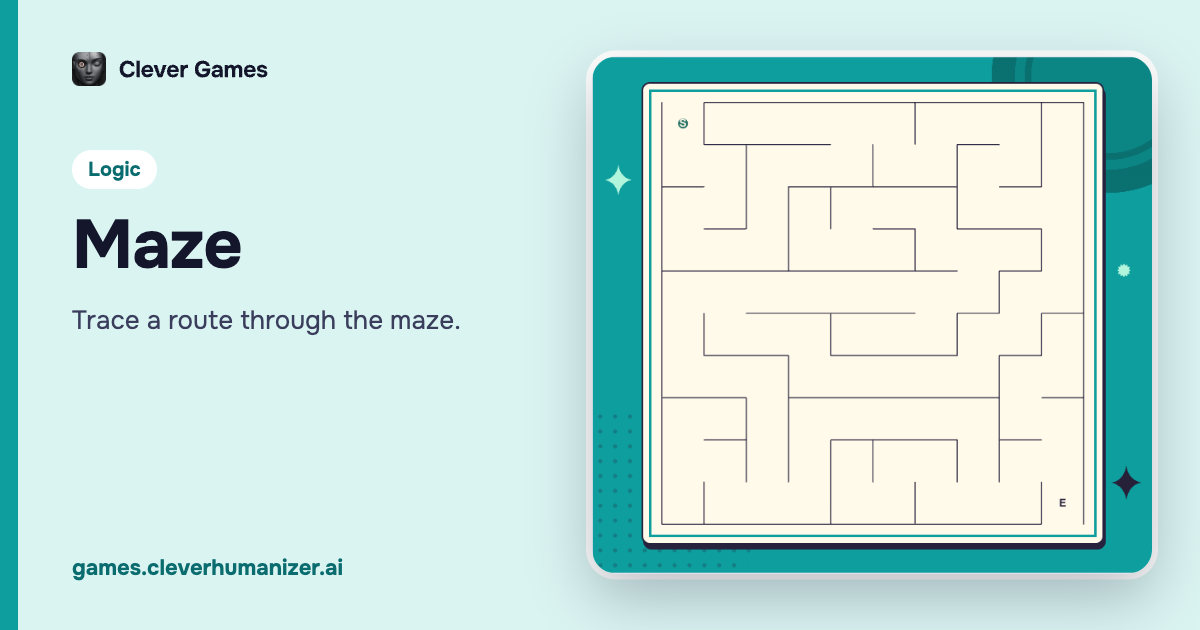
Figure 1. An Easy square maze with an entrance and an exit.
What tips help you solve mazes faster?
Treat every junction as a decision to remember. When a branch ends, return to the last junction and try the opening you have not explored. Your visible trail shows the difference between the way back and a fresh branch.
Look beyond the next cell before moving. A passage that points toward the exit can still end in a dead end, while one that first leads away can be the right way. On a circular board, compare the next ring as well as the next sector. On a hexagonal board, follow shared sides carefully instead of assuming square directions.
When the cells are too small to trace easily (a Huge maze, or a large one on a small screen), zoom buttons appear in the corner of the board: + makes the cells larger and the view then follows your marker, Pan lets you drag it around, and Fit shows the whole maze again when you want the overview. On a dense board the on-screen arrows or the keyboard can be easier than dragging through narrow corridors.
If you want a small nudge, Hint highlights the next five steps toward the exit from your current position. You can ask as often as you like, and the result panel records how many hints you used. In a dead end, the highlighted step may be the way back.
How does the maze generator print circular and hexagonal mazes with a solution key?
Choose Generator to make a maze to print, then press Print to open your browser’s print dialog with the blank maze and a separate solution page. Circular and hexagonal mazes print the same way as square ones.
In Generator, you pick the shape, level and style and see a preview before you print. The sheets print on US Letter paper and carry only the maze, a heading with its shape and size, and a one-line reminder to trace from S to E, so they stay clean on paper. The sheets are built on your device, so the maze is not sent to a server. Keep the solution page apart from the puzzle if you want to solve on paper first. For a very large board, check the preview and choose a smaller level if the passages look too tight for your paper size. After a solve, the Print button beside Share prints the maze you just played, with its solution page.
Show solution, the Solution button in the tools row, is the second main feature. It plays the full route from entrance to exit as an animation, and with reduced motion enabled the route appears at once. While it runs, the button reads Stop, your own input is off and the page says “Solution shown. Try a new maze?” New puzzle gives you a fresh maze. If you press Stop and walk to the exit yourself, the result says Guided solve, gives no time rating and the round is not counted as solved.
Who are these mazes especially useful for?
These mazes suit anyone who wants a quick puzzle that needs no instructions, and the same page works on a phone, a tablet or a computer.
- Students and teachers: the printable sheets give a class a blank maze and a separate answer page for checking. Teachers can pick a shape and level that fits the group.
- Families: Easy mazes are short and forgiving, so players of different ages can take turns on one screen or race on paper.
- Seniors: large on-screen arrows and the option to use the keyboard make movement simple, and nothing is timed against you.
- Commuters: a round takes about two minutes, and progress is saved on the device if you leave mid-maze.
What are the benefits of solving mazes?
Solving a maze gives you practice at checking connections, remembering junctions and revising a plan after a dead end. You can explain why a move is legal, trace a branch before committing to it, or compare how your approach changes between shapes. These describe the activity itself; they are not promises about health or measured changes in ability.
Mazes also reward patience and attention. Looking two or three cells ahead builds the habit of reading a layout before acting, which carries over to other logic puzzles. For deliberate practice, press Restart to retry the same layout and find the junction where you went wrong. Use New puzzle when you want an unfamiliar route. A repeat attempt draws on memory, so compare times only between mazes of the same shape and level.
What is the history of mazes and maze generators?
People have drawn mazes for thousands of years, and the word is often used alongside labyrinth, a path winding toward a center. Hedge mazes became a garden feature in Europe, and the one at Hampton Court Palace in England, planted in the late 1600s, is among the best known.
Computer-generated mazes link path puzzles to graph theory. A board is a set of cells joined by possible passages, and a perfect maze is a spanning tree of that graph: every cell is reachable and there are no loops. The three styles here borrow names from standard algorithms. Winding uses the recursive backtracker, a depth-first search. Branching follows Prim’s algorithm, described in the paper “Shortest Connection Networks and Some Generalizations” (Bell System Technical Journal, 1957). Even uses Kruskal’s algorithm, published in 1956. In a puzzle they only decide how the passages are carved, which is why each gives a different texture.
What are the most frequently asked questions about mazes?
How does the maze timer work?
The timer counts up while you play and stops when you pause or finish. There is no time limit, so you can focus on the route. The result panel shows your time, your moves and any hints used, along with a rating of up to three levels based on a benchmark for that shape and level.
Can a generated maze have no solution?
No. Every maze is perfect, so there is exactly one route from entrance to exit. A dead end means that branch is wrong, not that the exit is unreachable. Go back to the last junction or ask for a Hint.
Can I take back a wrong turn without starting again?
Yes. Drag or step back along your own trail and it erases as you go. There is no error count and no penalty for a dead end.
What is the difference between Hint and Show solution?
Hint shows the next five steps from your current position and can be used as often as you like. Show solution plays the entire route from entrance to exit, and a round in which you used it is not counted as solved. Neither moves your marker to the exit for you in a counted attempt.
Can I print a circular or hexagonal maze with the answer?
Yes. Choose the shape in Generator and press Print. Your browser’s print dialog opens with the blank maze and a separate solution page. This works for every shape and level, including Huge.
Does Restart make a new maze?
No. Restart clears your trail on the same layout, while New puzzle creates a different maze with your current settings. Use Restart to revisit your decisions and New puzzle for an unfamiliar route.
Is this maze generator free, and do I need an account?
It is free, with no sign-up. Progress is saved on this device, and the page keeps working offline once it has loaded. Mazes are made on your device without a server.
Is the 60×60 Huge maze playable on a phone?
Yes. When the cells are small (a Huge maze, or a large one on a small screen), the zoom buttons in the corner of the board make the passages large enough to trace; the view then follows your marker, and Fit shows the entire maze. You can also print a Huge maze from Generator.